From a Sentence to a Governable App: How AI Generates App Metadata
The important part of AI Builder is not turning one sentence into pages, but decomposing a business request into objects, fields, views, workflows, permissions, automation, and agent tools.
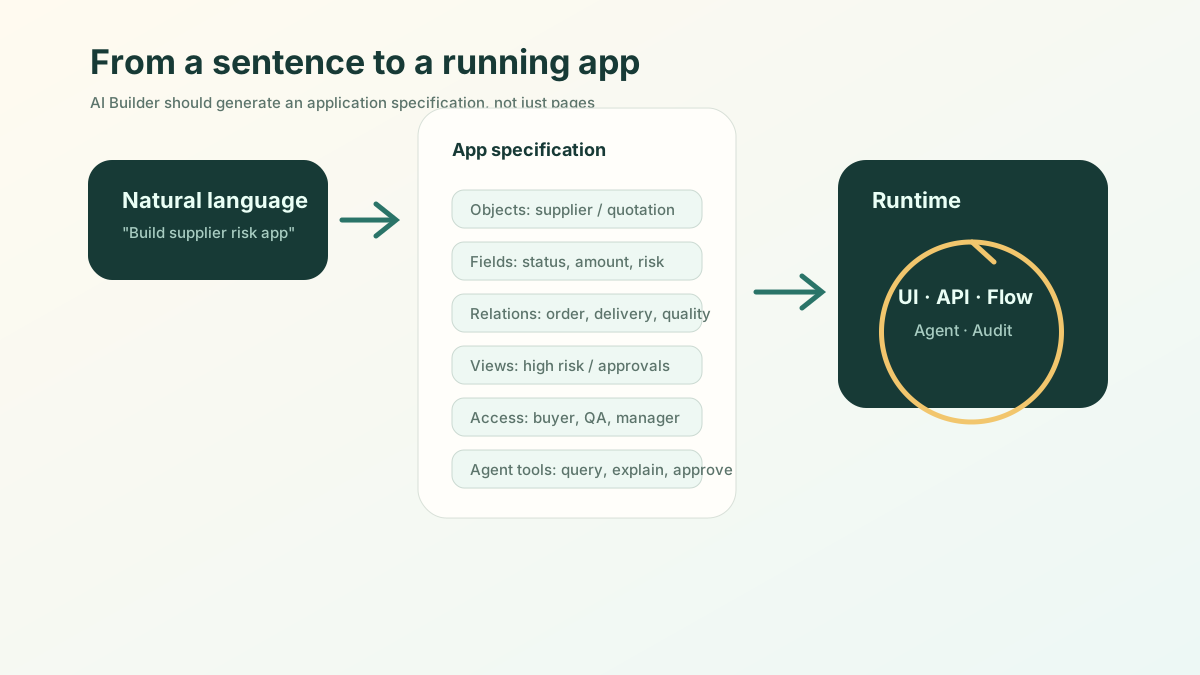
The short version: A good AI builder does not turn a sentence into a few pages; it decomposes one business requirement into objects, fields, views, flows, permissions, and agent tools: a runnable, changeable, governable app specification.
“Generate an app from one sentence” sounds powerful, but it can also be misleading.
If readers imagine a prompt that simply creates a few pages, the idea is not very different from many code generation demos. The more important question is how AI Builder decomposes a business request into application metadata that can run, change, and be governed.
Consider this request:
Help me build a supplier risk management application. The system should manage suppliers, qualifications, quotes, purchase orders, deliveries, and quality issues. AI should detect expired qualifications, abnormal quotes, and delivery risk. High-risk suppliers for critical materials should require purchasing manager approval.
The real reader question is: what happens after this sentence enters the platform?
Step One: Generate a Business Object Graph, Not Pages
AI Builder should first identify the nouns in the business domain.
In this example, the application is not a single “supplier table.” It is a set of related objects:
supplier: the supplier entity;supplier_qualification: licenses and certifications;quotation: quote records;purchase_order: purchase orders;delivery_record: delivery history;quality_issue: quality incidents;supplier_risk: risk records;approval_task: approval tasks.
This step matters because objects define the boundary of the application.
If the system only has one large table, it becomes hard to answer questions such as “which delivery, quote, or qualification caused this risk?” When objects are separated clearly, risks can link to evidence, approvals can link to reasons, and Agents can explain their basis.
Step Two: Fields and Relationships Must Carry Business Meaning
A low-quality generator treats fields as form inputs. A serious builder treats fields as business semantics.
A qualification object is not just an attachment. It needs qualification type, certificate number, effective date, expiry date, review status, reviewer, linked supplier, and whether the qualification is critical.
A quotation object is not just an amount. It needs material, quantity, unit price, validity period, deviation from historical average, whether transportation and service are included, and the linked purchase request.
Relationships are just as important. A supplier may have many qualifications, quotes, orders, deliveries, and quality issues. A risk record must point back to the evidence that produced it.
When this layer is generated well, later AI analysis is no longer “model guessing.” It becomes an explanation based on object relationships.
Step Three: Generate Views for Different Roles
Enterprise applications should not show everyone the same table.
AI Builder should generate initial views by role:
| Role | Views |
|---|---|
| Buyer | My suppliers, missing qualifications, quote comparison |
| Purchasing manager | High-risk suppliers, pending approvals, critical material risk |
| Quality owner | Recent quality issues, repeated defects, remediation status |
| Legal / compliance | Qualification gaps, contract risk, supplier blacklist |
| Management | Risk distribution, supplier concentration, purchasing trends |
This resembles view configuration in low-code platforms. The value of AI Builder is that it can generate a reasonable starting point from the business request.
The user does not start from a blank canvas.
Step Four: Generate Permissions and Action Boundaries
Permissions are often ignored in AI Builder demos, but they separate professional platforms from toys.
In the supplier application, the platform should generate boundaries such as:
- buyers can maintain supplier profiles but cannot change quality conclusions;
- quality owners can close quality issues but cannot approve purchase orders;
- purchasing managers can approve high-risk procurement;
- ordinary users cannot see sensitive supplier financial data;
- AI can suggest risk but cannot automatically blacklist a supplier;
- high-risk actions for critical materials require approval.
These are runtime rules, not page details.
If an Agent later receives “find high-risk suppliers and pause purchasing,” it must operate within these action boundaries. Otherwise, the more AI Builder generates, the more risk it creates.
Step Five: Generate Workflows, Automation, and SLAs
Static business objects are not enough. The application must move work forward.
The workflow may include:
- Create a new supplier profile.
- Upload qualifications.
- AI checks qualification completeness.
- Quotes enter comparison.
- Purchase orders are created.
- Delivery records are written back.
- AI identifies risk.
- High risk enters approval.
- Remediation or alternative supplier suggestions are created.
- Risk is closed with an audit trail.
Automation should also come from the request:
- remind users 30 days before a qualification expires;
- block new purchases when a critical qualification is expired;
- create a risk record when on-time delivery drops below a threshold;
- create review tasks when similar quality issues repeat;
- remind the purchasing manager when high-risk approval is overdue.
That is “generating an application,” not merely “generating pages.”
Step Six: Generate Agent Tools and Explain What They Can Do
The final layer of an AI-native application is agent tooling.
The platform should generate governed tools rather than letting the model access the database directly. Examples include:
- query supplier risk;
- compare quotes;
- explain risk sources;
- create review tasks;
- start high-risk purchase approval;
- generate a monthly supplier risk report.
Every tool needs inputs, outputs, permissions, and audit.
When a user asks, “Can we still place an order with this supplier?”, the Agent should query supplier data, qualifications, deliveries, quality issues, and quotes, then return a conclusion with evidence. It may suggest reducing first-order quantity or requesting missing qualifications, but pausing procurement or starting approval must go through platform actions.
Good Builders Show a Generation Plan
From the reader’s perspective, AI Builder must earn trust.
It should not silently generate everything. It should show a generation plan:
- which objects will be created;
- the key fields on each object;
- relationships between objects;
- views to generate;
- permission rules to apply;
- automation to run;
- tools the agent can call;
- actions that require human confirmation.
Only after confirmation should the application be generated. AI Builder is not a black box; it is a collaborative application architect.
The ObjectStack Generation Chain
ObjectStack’s AI Builder should translate natural language into an application specification, then let that specification drive the runtime.
The chain is:
Natural language requirement → business objects → fields and relationships → views and forms → permission boundaries → workflow automation → Agent tools → audit runtime
The clearer this chain is, the easier it is for readers to understand the platform difference.
Generating an app from one sentence is not magic. The real value is knowing which metadata layer the sentence should affect, and how those metadata layers work together to drive a running business system.