The commercial runtime environment built on ObjectStack
The ontology
is the software.
One executable business ontology. AI writes it, the runtime runs it, agents operate it, you own it. Want the same loop hosted, in the browser, nothing to install? That's ObjectOS, the commercial runtime environment built on ObjectStack. ObjectOS runs hosted in the browser with nothing to install (ObjectOS Cloud) or self-managed on your own infrastructure (ObjectOS Enterprise), and on either edition you can export your ontology and run it on the open-source ObjectStack runtime.
- Executable
- The runtime runs it
- AI-writable
- AI writes it
- Agent-operable
- Agents operate it
- You own it
- Export your ontology, run it on open-source ObjectStack
For AI-written enterprise software
Keep the systems that work.
Add a governed runtime for agents.
Enterprise AI does not need another rebuild project or another pile of generated code. It needs one definition agents can write, humans can review, and a runtime can govern across legacy systems, new applications, and AI agents. Your objects and fields, relations, actions, permissions, flows, and agent and tool definitions are that definition — your business ontology: open, versioned, and yours, not an asset locked inside someone else’s platform.
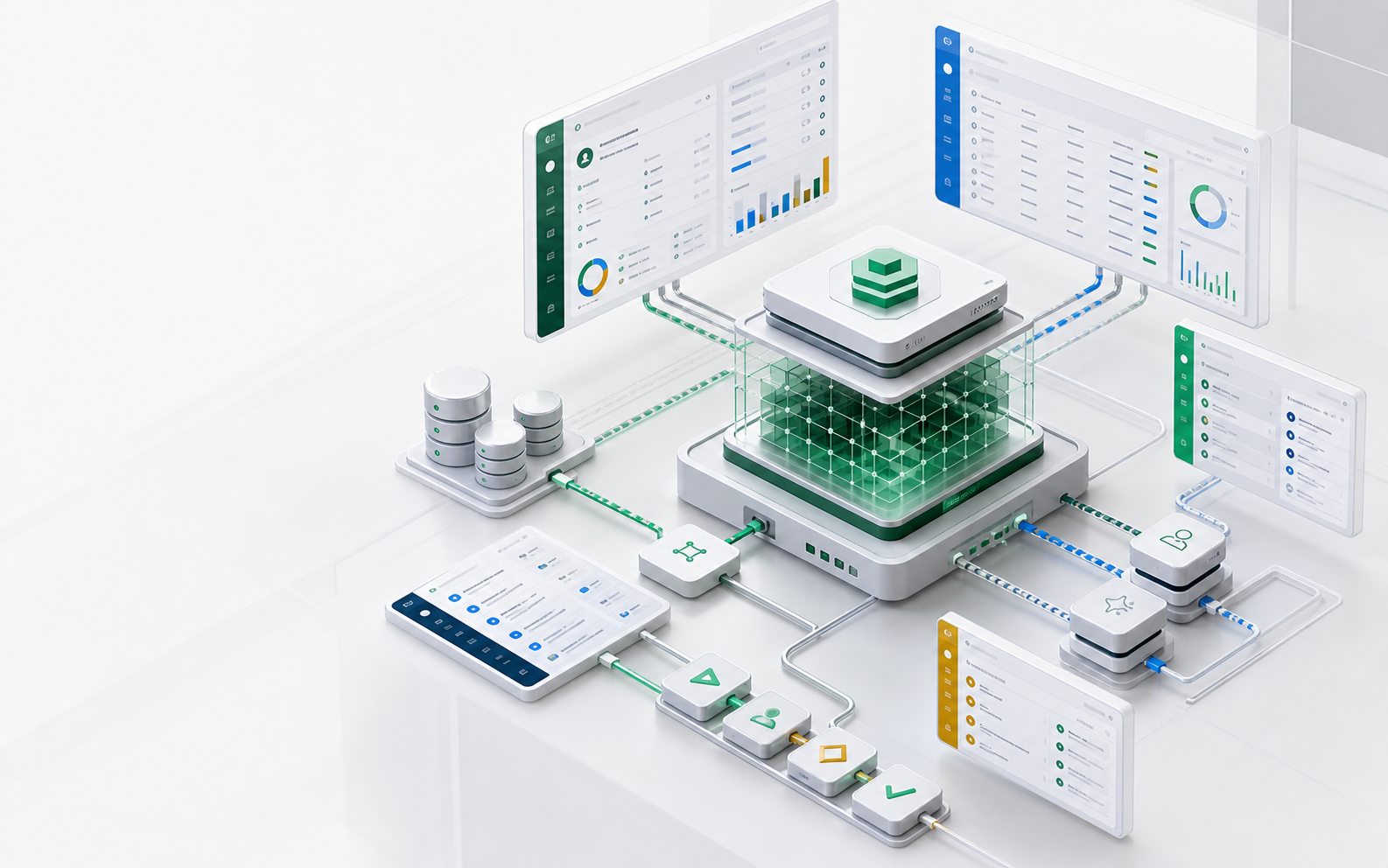
Platform capabilities
Start with the business model,
not a blank codebase
- 01
Give agents a business model
Model customers, orders, equipment, cases, and approvals as objects agents can read, relate, and act on.
- 02
Extend systems without replacing them
Add APIs, permissions, workflows, and intelligence on top of databases, ERP, CRM, and custom systems.
- 03
Generate metadata, not app code
For typical CRUD and workflow software, agents write the compact ObjectStack definition; the open ObjectStack runtime derives tables, APIs, UI, and tools, then enforces permissions and audit, while ObjectOS handles production deployment and team operations. Less code to generate, less code to review.
- 04
Enforce governance at runtime
Reuse enterprise identity, permissions, approval queues, and audit logs so every agent action has a defined boundary.
AI build and agent operations
Let agents create the software.
Keep people in the review loop.
ObjectStack keeps objects, fields, workflows, permissions, actions, and UI as typed definitions agents can read and change. Its open runtime derives the database, APIs, screens, and MCP tools, then enforces permissions and audit on every call. Strict TypeScript, Zod schemas, and a validation gate catch structural mistakes before deployment. The definition stays small enough for AI to hold whole, so a coding agent can reason across the entire system and you can review the diff. ObjectOS is the commercial runtime environment built on ObjectStack: in-app AI Build & Ask, human approvals, SSO, deployment, and operations on Cloud and Enterprise; bring your own coding agent and MCP client on open-source ObjectStack.
View the AI security model →AI Builder
Cloud & Enterprise: describe a change in natural language. The in-app Builder generates objects, fields, views, and workflows, then routes structural changes for approval. On the open-source ObjectStack, your coding agent writes the same compact metadata diff instead of a full app codebase.
AI Ask
Cloud & Enterprise: ask questions inside the product, analyze business context, and trigger approved actions within the signed-in user’s permissions. On the open-source ObjectStack, query the same objects through MCP with your own AI.
Tools / MCP
All editions: @objectstack/mcp exposes objects, queries, and actions as policy-aware tools for Claude, Cursor, any MCP client, or a local model.
How it works
Turn business operations into
a structure agents can use
ObjectStack describes objects, relationships, permissions, workflows, and actions as unified typed definitions. Agents change a context-sized definition layer instead of regenerating application code; ObjectOS gives teams the review, deployment, and operational controls that keep every iteration understandable, approved, and governed.
Security and governance
Keep data in your network.
Let AI work inside permissions.
ObjectOS Enterprise can deploy and operate ObjectStack apps on your infrastructure. Business records, identities, audit logs, and files stay under your control; AI agents access objects through governed tools and inherit the signed-in user’s permissions.
Explore security and governance →Data residency
Connect your databases and storage; records, identities, audit logs, and files stay there. Self-managed ObjectOS validates its license online (air-gapped Enterprise licenses validate offline); the open-source ObjectStack runtime has no telemetry, no license check, and no update ping.
User-scoped AI
Agents act as signed-in users and obey object, record, and field permissions, so they cannot see data the user cannot see.
Approval and audit
Structural changes go through a human approval queue. Reads, writes, tool calls, and permission changes can be written to audit logs.
Offline ready
Run in a VPC, on local servers, or in air-gapped networks with local models, internal identity, and your own secrets management.
Application templates
Start with working templates,
not a blank canvas
Helpdesk template
An AI-first customer support template for tickets, SLA, summaries, suggested replies, and knowledge retrieval.
View template source →Contracts template
Manage the contract lifecycle with metadata extraction, approval, renewal reminders, and audit trails.
View template source →Procurement template
Run purchase requests, suppliers, POs, receiving, and three-way matching as a governed application.
View template source →How it compares
Different from
the tools you know
vs Airtable
A real database with server-side logic and runtime governance — not a spreadsheet-style workspace.
Read the comparison →vs Retool
Business logic is reviewable metadata — not JavaScript scattered across screens.
Read the comparison →vs Lovable & Bolt
Agents generate governed metadata with schema and permissions — not a one-off codebase.
Read the comparison →Latest insights
Practical thinking on AI-native software
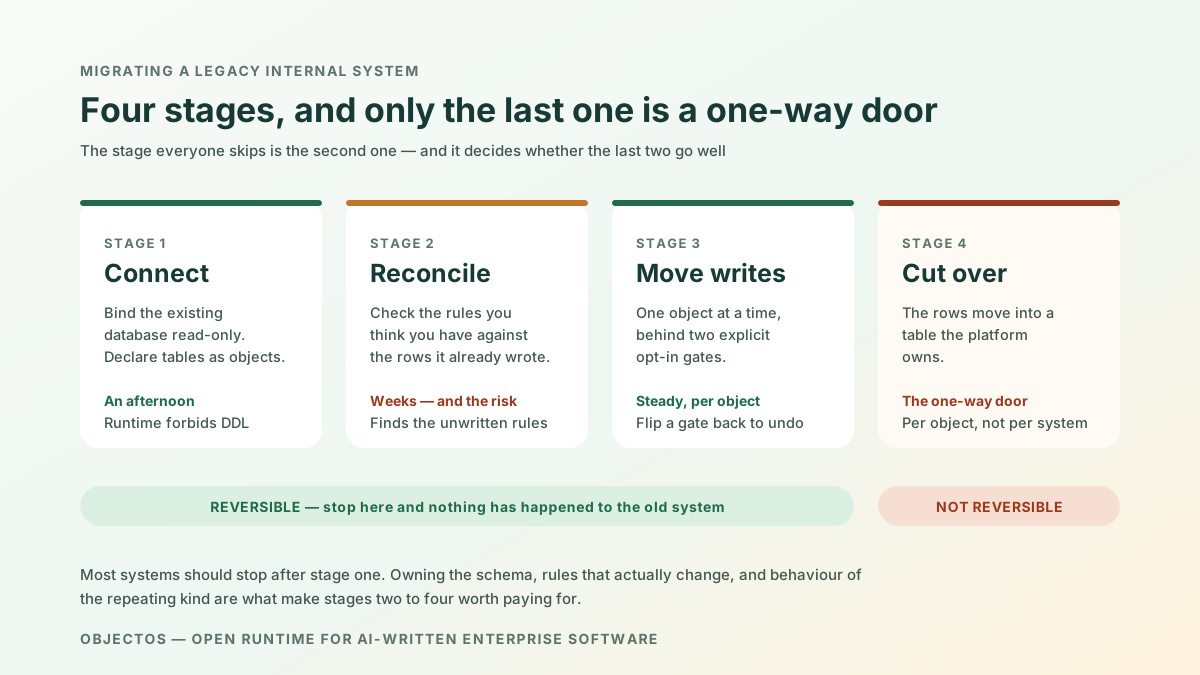
How to Migrate a Legacy Internal System to Metadata Without a Big-Bang Rewrite
A staged path off a legacy internal system - connect it read-only, measure how often your declared rules disagree with what it actually did, enable writes one object at a time, then cut over. Including when not to migrate.
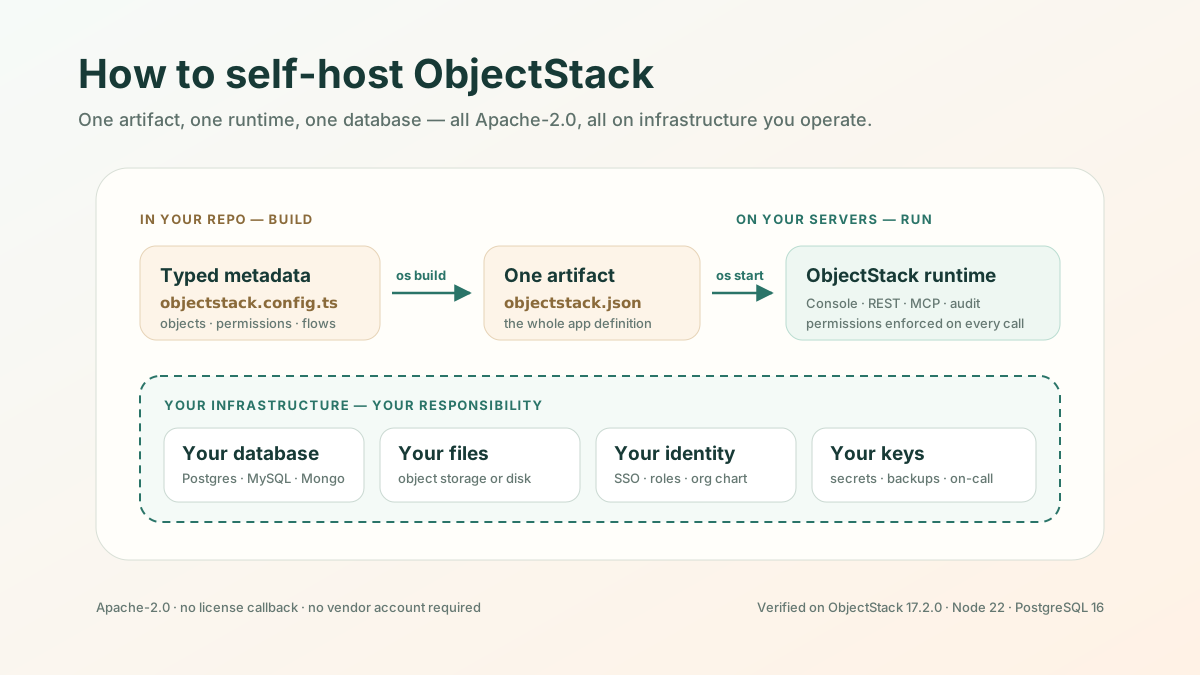
How to Self-Host an AI App Platform: ObjectStack from Install to Verified
A walkthrough of self-hosting the open-source ObjectStack runtime: the compiled-artifact model, the database driver everyone misses, how to prove the install is correct, and what you are now on call for.
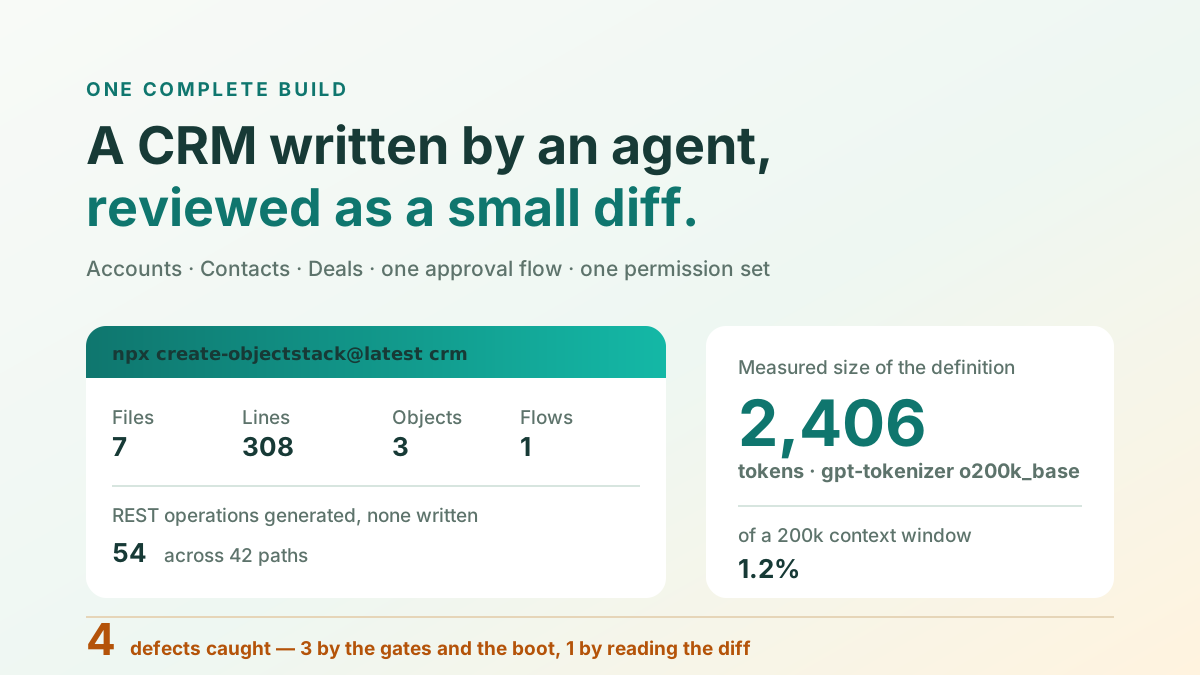
Build a CRM With an AI Agent: The Whole Build, Including What Broke
One complete CRM built end to end — scaffold, three objects, an approval flow, a permission set. 2,406 measured tokens, 54 generated API operations, and the four defects caught before a human reviewed anything.
Next step
Start with the business data you know best.
Connect one existing system, define its key business objects, and let your agent ship the first governed AI-written application as a small metadata diff.
Learn how to connect existing systems →