How to Self-Host an AI App Platform: ObjectStack from Install to Verified
A walkthrough of self-hosting the open-source ObjectStack runtime: the compiled-artifact model, the database driver everyone misses, how to prove the install is correct, and what you are now on call for.
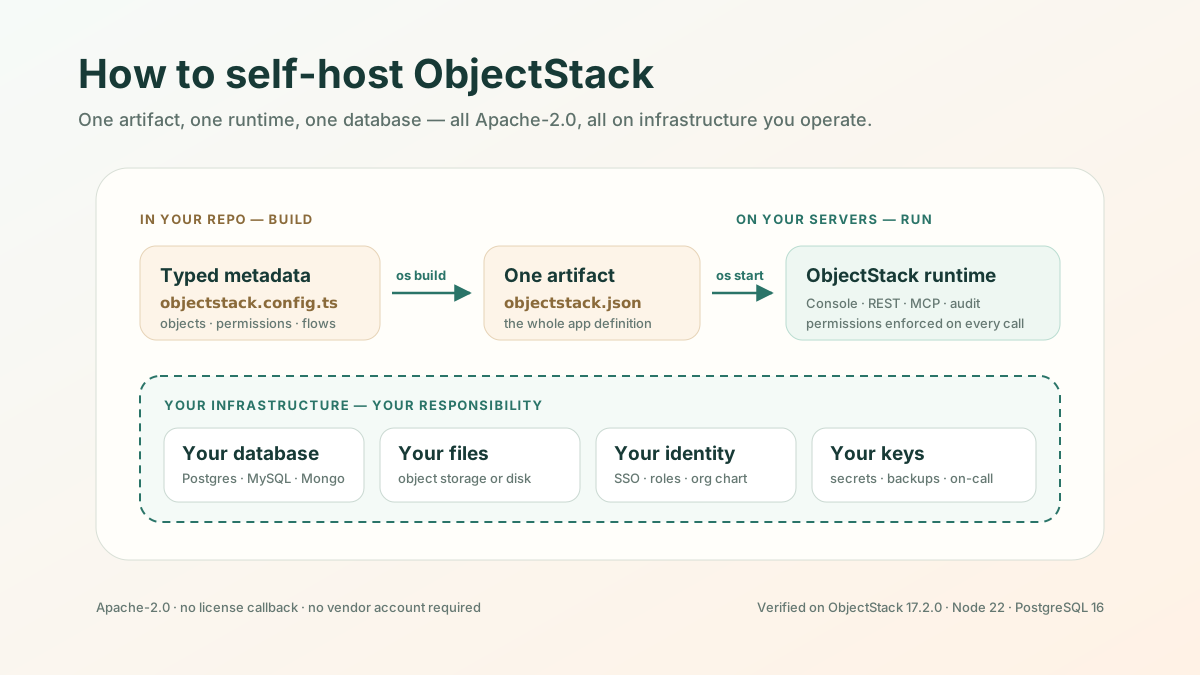
The short version: self-hosting ObjectStack is one process against one database. You compile your app into a single JSON artifact with os build, hand that artifact to os start or to the official runtime image, point OS_DATABASE_URL at a Postgres you operate, and pin two secrets. On an empty database the first boot creates its own schema — 68 tables in the app I built for this article — and serves the Console, the REST API, and an MCP endpoint under your permissions. All of it is Apache-2.0, with no license callback and no vendor account. What you take on in exchange is upgrades, backups, and a pager.
Why the runtime should be yours is argued elsewhere: the general case, and the same case against Power Platform. This page assumes you have decided, and wants to give you the procedure, the failure modes, and an honest bill.
Every command below was run against ObjectStack 17.2.0 on Node 22 and PostgreSQL 16. Where something could not be run, the text says so.
What you are actually deploying
The mental model matters more than any single command, because it makes the rest predictable.
An ObjectStack app is not a codebase you deploy. It is typed metadata — objects, fields, permissions, flows, views — that os build compiles into one file, dist/objectstack.json. That file is the whole application definition; the runtime is generic and knows nothing about your business until it reads it:
objectstack.config.ts ──(os build, in CI)──▶ dist/objectstack.json ──(os start, on your server)──▶ running appTwo consequences fall out, and both are load-bearing for operations.
First, the artifact is small and the runtime is large. The one-object app I compiled here produced a 2.2 KB artifact. Booting it against an empty Postgres created 68 tables — my one object plus the platform’s own: sys_audit_log, sys_api_key, sys_business_unit, and the rest. You ship kilobytes; the runtime brings the governed platform with it.
Second, deploys are file swaps. No build on the server, no migration script to sequence by hand. Replace the artifact, restart, and the runtime reconciles the schema. Roll back by restoring the previous artifact.
That metadata is also your open business ontology — a versioned definition of your objects, permissions, and flows that lives in your repository and outlives any one host. Self-hosting makes that ownership operational rather than theoretical: you hold the definition and the thing that runs it.
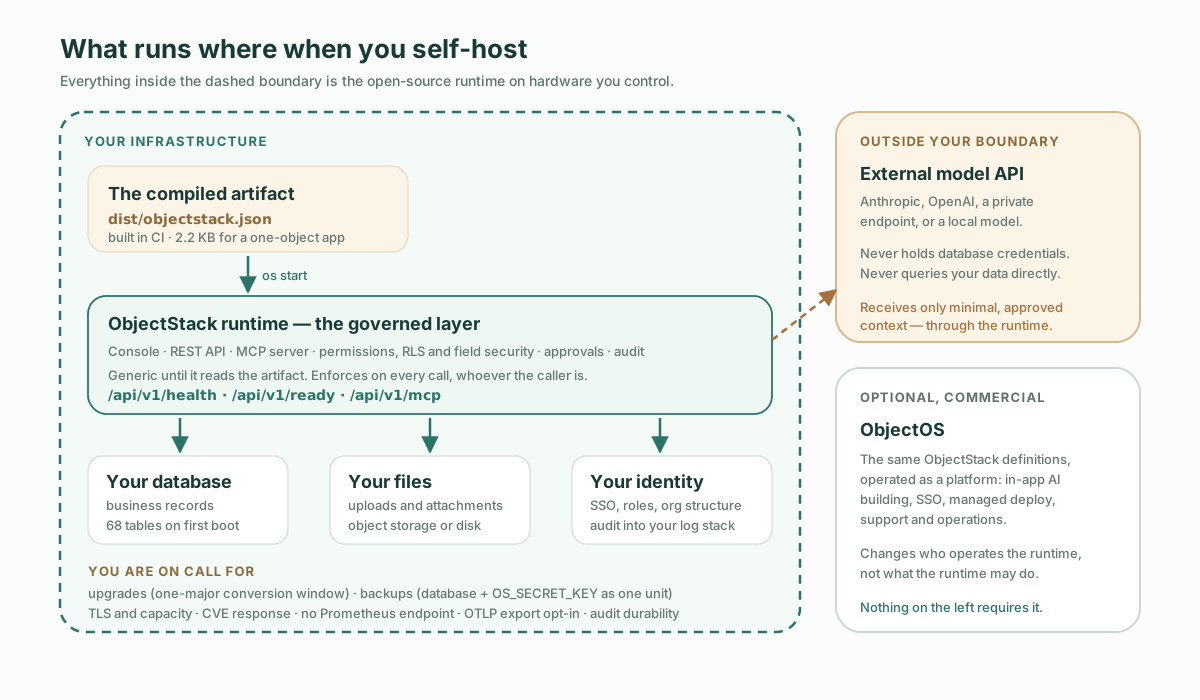
The boundary: ObjectStack vs ObjectOS
A self-hosting guide has to get this exactly right: the two names are easy to blur, and the blur always favours the vendor.
| ObjectStack | ObjectOS | |
|---|---|---|
| What it is | The open framework and production runtime | A commercial platform for the same apps |
| License | Apache-2.0 | Commercial; no open-source edition |
| How you build | Your repo, your coding agent, metadata as files reviewed as diffs | In the browser, Build & Ask, on a governed platform |
| Self-hosting it | This article | Cloud, or Enterprise operating the runtime in your infrastructure |
The important claim, stated plainly: everything in this walkthrough is the open stack. The runtime, the Console, permissions, RLS, audit, and the MCP server are all in the Apache-2.0 repository and the official image. No commercial license is required to run any of it in production, and the runtime needs no telemetry or license callback to operate.
ObjectOS is the optional commercial layer on the same definitions — in-app AI building, SSO, managed deployment, support. Choosing it decides who operates the thing, not what the runtime is allowed to do. Self-hosting does not put you on a crippled community edition; it is the same runtime, operated by you.
Prerequisites
- Node 22 or newer. The CLI declares
>=22.0.0and will not run on older. - A database you operate. Postgres is the standard choice. MySQL, MongoDB, SQLite, and Turso are supported with real caveats — MongoDB refuses to boot in a multi-tenant deployment at all, and MySQL cannot enforce two integrity guarantees the other engines do — it has no conflict target on upsert, and a unique index on a long text column is bounded by key length. Check Data Sources before choosing anything else.
- Somewhere to put files, if your app takes uploads. The default local driver writes into the runtime’s home directory, which is wrong for containers.
- A secret manager. You are about to generate two keys you must not lose.
Step 1 — Scaffold and compile
npm create objectstack@latest my-app && cd my-app
npx os build
The scaffolder writes objectstack.config.ts, a starter object, an AGENTS.md so your coding agent starts with the protocol’s rules loaded, plus a Dockerfile and a docker-compose.yml. os build (an alias of os compile) validates the metadata and emits the artifact:
✓ Build complete (173ms)

  Data: 1 Objects  2 Fields
  UI: 0 Apps
  Logic: 0 Flows
  Security: 0 Positions  0 Permissions
  Runtime: 3 plugins

  Artifact: dist/objectstack.json (2.2 KB)
If validation fails, it fails here — before any server exists. That is the point of a compile step: the gate rejects metadata that would break at runtime, and in the agent-authored workflow the agent fixes it before you see a diff.
Step 2 — Install the database driver
This is the step that catches people, so it gets its own heading.
The SQL driver treats pg, mysql2, and tedious as optional peer dependencies. npm does not install optional peers, so a fresh project has SQLite and MongoDB support but no Postgres driver. Point it at Postgres anyway and the boot stops dead:
✗ datasource 'default': connect failed — Knex: run
$ npm install pg --save
Cannot find module 'pg'
The failure is loud and names its own fix — the runtime refuses to start rather than quietly falling back to a SQLite file, which is the correct behaviour and worth appreciating the day it saves you. Install the driver:
pnpm add pg # or: npm install pgThe same applies to mysql2 for MySQL and @objectstack/driver-turso for Turso. If you are building a container image, make sure the driver lands in the runtime layer, not just the build layer — the official image ships the CLI and nothing else, so an image that copies in only the artifact has no driver either.
Step 3 — Pin the four values that matter
os start is built to boot with none of these set, and that is exactly why they are easy to miss. Each one has a default that is reasonable on one developer box and wrong on a server that will be replaced:
| Variable | What happens without it |
|---|---|
OS_DATABASE_URL | Data silently lands in a SQLite file in the runtime’s home directory — fine on one box, wrong in a container that will be replaced. |
OS_AUTH_SECRET | os start mints one and persists it to <home>/auth-secret (mode 0600). Authentication still works — but on an ephemeral filesystem the next boot mints a different one and every existing session is invalidated. Run two replicas and each mints its own, so a session issued by one is rejected by the other. |
OS_SECRET_KEY | Same shape, worse ending: auto-minted and persisted, so on an ephemeral filesystem the key is lost on restart and everything previously encrypted with it becomes undecryptable. Set OS_CLUSTER_DRIVER and the runtime stops auto-minting and fails loudly instead — a multi-node deploy must be handed one shared key. |
OS_PORT | os start fails loudly on a busy port — it never shifts like the dev server. Keep it in sync with your proxy upstream. |
Read the two middle rows again, because they fail in the least useful way available: not at boot, and not visibly. A server started with neither secret comes up clean, authenticates correctly, and passes every check in the next section. You find out weeks later — when a routine restart signs out every user at once, or when a second replica goes in and sessions start flapping between nodes, or when a restored backup turns out to hold secrets nothing can decrypt. These two variables are not there to make the first boot work. They are there to make the second one work.
Generate them once and put them in your secret manager the same day:
OS_AUTH_SECRET=$(openssl rand -hex 32)
OS_SECRET_KEY=$(openssl rand -hex 32)
Those four decide whether a deployment survives its second boot. The rest of the environment contract — cluster settings, tenancy posture, observability, and the names that have been retired — is documented in Environment Variables, which is versioned with the runtime in a way this page is not.
Step 4 — Start it
OS_DATABASE_URL="postgres://user:pass@db-host:5432/myapp" \
OS_AUTH_SECRET=... OS_SECRET_KEY=... OS_PORT=8080 \
OS_ARTIFACT_PATH="$PWD/dist/objectstack.json" \
npx os start
A healthy boot announces what it resolved, which is the first thing to read:
✓ Server is ready
  ➜  API:       http://localhost:8080/
  ➜  Console:   http://localhost:8080/_console/
  ➜  MCP:       http://localhost:8080/api/v1/mcp
  Mode:    production
  Driver:  SqlDriver(pg)  → postgres://127.0.0.1:5432/myapp
  Tenancy: single
  Plugins: 33 loaded
Driver: is the line to check. If it says SQLite when you meant Postgres, your OS_DATABASE_URL did not take effect, and you will not find out any other way until the box is replaced.
The artifact also boots on its own, which is the claim worth testing yourself. Copy objectstack.json into an empty directory with no project source and no node_modules, point the CLI at it, and the runtime announces No objectstack.config.ts found — booting from artifact (default host)... and proceeds to serve it. The artifact really is the app.
Two details that will cost you a few minutes if nobody says them. npx os start only resolves inside a project that already has the CLI in node_modules; from a bare directory you need the package name, npx @objectstack/cli@<version> start, or a global install. And a CLI installed that way is a fresh install — so it has no pg either, and the boot ends in exactly the Step 2 error. The driver has to be resolvable from wherever the runtime actually runs, which is the same rule as the container layer, wearing different clothes.
Containers, the standard path
The project ships an official multi-arch image, ghcr.io/objectstack-ai/objectstack, whose tag always equals the @objectstack/cli version inside it. The scaffolded Dockerfile builds the artifact in one stage and copies it onto that image; the scaffolded docker-compose.yml brings up the app plus a Postgres with a healthcheck. Pin the exact X.Y.Z tag in production, not latest.
The container path is the one part of this article I did not execute — the machine I verified on had no Docker daemon. Everything above it was run end to end. What I did do is read the image’s own build definition, which is public and in the framework repository: it installs @objectstack/cli globally and nothing else, runs as a non-root node user, presets OS_ARTIFACT_PATH=/srv/app/objectstack.json and OS_PORT=8080, sets NODE_ENV=production, and declares a HEALTHCHECK against /api/v1/health. That is where the Step 2 warning comes from and why it is not a guess: a globally installed CLI has no pg, so an image that copies in only your artifact will fail to connect exactly as it did above. Follow the deployment guides for Docker, Kubernetes, and air-gapped specifics.
How to verify the install is correct
A boot that prints no errors is not a verified install. Five checks, each failing differently:
1. The process is alive.
curl -fsS http://localhost:8080/api/v1/health
{"success":true,"data":{"status":"ok","timestamp":"2026-09-15T09:12:41.107Z","version":"17.2.0","uptime":60.93}}
2. It is ready for traffic. Use this one, not /health, as the readiness probe in an orchestrator — liveness and readiness are different questions.
curl -fsS http://localhost:8080/api/v1/ready
{"success":true,"data":{"status":"ready","state":"running"}}
3. The schema actually landed in your database. This is what catches a driver silently resolving to SQLite:
SELECT count(*) FROM information_schema.tables WHERE table_schema='public';
-- 68
4. The anonymous gate is live. An unauthenticated data request must be refused — 401, with a machine-readable code and not merely a status:
curl -s -o /dev/null -w '%{http_code}\n' http://localhost:8080/api/v1/data/note
401
curl -s http://localhost:8080/api/v1/data/note
{"error":"UNAUTHENTICATED","code":"UNAUTHENTICATED","message":"Authentication is required to access this endpoint."}
A 200 with records here means your server is open to the internet. Treat it as an incident, not a configuration preference.
Be clear about what this check does not prove: it passes whether or not you set OS_AUTH_SECRET, because the runtime mints one either way. It verifies the gate, not the key. And if you script it, assert the code field — /data and /meta answer with this flat shape, while dispatcher-served routes wrap the same denial as {"success":false,"error":{"code":…}}. Read the envelope the endpoint you called actually declares; a tolerant reader that accepts either is exactly where a future envelope regression would hide.
5. Claim the admin account before anyone else does. A fresh production database has no users, and on a single-tenant deployment — the default, and what the banner’s Tenancy: single line confirms — the first account to register is promoted to platform admin. Open the root URL and sign up immediately after the first deploy, before the URL is shared. The production server seeds no default credentials; the demo account you may know from os dev exists only on empty development databases.
If you are deploying a walled multi-tenant posture instead, that path is deliberately gone: you must name the owner in OS_PLATFORM_OWNER_EMAIL, and the runtime refuses to start without it — precisely so that whoever reaches the sign-up endpoint first cannot collect cross-tenant admin.
What you just took on
Self-hosting does not buy convenience. Here is the honest bill.
Two upgrade clocks, and only one of them is yours. This is the piece teams model wrong, so name it. The platform runtime moves on the project’s cadence: you move the image tag and restart. Your metadata app moves on yours: edit source, rebuild. They are independent — a platform move does not rewrite your app, and republishing your app does not move the runtime. But one hard limit couples them: the metadata conversion window is one major wide. The runtime reads metadata authored against the previous major and converts it on load; fall two majors behind and that stops working. The failure mode this creates is a deployment nobody touches for a year — a calendar problem, not a technical one.
Backups are a two-part unit, and half of it is not in the database. Every stored secret is encrypted under OS_SECRET_KEY, so a perfect pg_dump restored without the original key leaves those values permanently undecryptable. Escrow the key the day you generate it and treat key-plus-database as one backup artifact. Your authored metadata needs no runtime backup — it is in Git, rebuildable with os build — so the real surface is the database, the uploaded files, and the secrets. Then rehearse the restore, because an untested backup is a belief.
On-call is now a name on a rota. Nobody else is watching the box: TLS and reverse proxy, availability and capacity, security baselines and CVE response, and the observability wiring. Be precise about that last one, because the shape surprises people in both directions. Telemetry export is built in but off: the exporter defaults to noop, and setting OS_OBS_EXPORTER=otlp with an OS_OTLP_ENDPOINT pushes OTLP/HTTP straight to your collector — no SDK to install, and in fact no @opentelemetry package anywhere in the dependency tree. What does not exist is a Prometheus /metrics endpoint to scrape. The model is push, not pull, so if your monitoring expects to scrape a target, that adapter is the piece you write.
Audit is half-done for you, and the remaining half is the half that matters legally. sys_audit_log is declared append-only, so the platform refuses edits and deletes through the API and no permission grant re-opens them. What that cannot do is defend the rows against anything holding the database credential — a direct UPDATE is still a direct UPDATE. If that log is going to be evidence in a compliance conversation, then WORM storage, off-box shipping, or cryptographic chaining is your design problem, not the runtime’s. Knowing which half you were given is the difference between an audit trail and a belief about one.
None of this is unusual for infrastructure you own. It is only surprising if you arrived expecting a managed platform with the price removed.
When not to do this
- You have no database on-call. The runtime is one process and genuinely easy to run. Postgres in production is the real commitment, and it is the one that pages at 3am.
- Your requirement was data residency, not operations. Residency and isolation are also reachable through a vendor operating the runtime inside your infrastructure. Self-hosting is the maximal answer to that question, not the only one.
- You are still evaluating. Do that on SQLite or a managed Postgres, where a wrong turn costs nothing.
Self-hosting is the right default when the runtime will hold real business operations, when the network is isolated, or when exit cost is explicitly part of the decision. It is overhead when none of those are true yet.
Start it the way you will run it
The fastest way to get this right is not to type any of it yourself. Point your coding agent at the ObjectStack skills bundle the scaffolder installed and describe the app; the agent writes the metadata, the validation gate rejects what would fail at runtime, and you review a diff instead of a codebase. Then connect that same agent to the running deployment over MCP at /api/v1/mcp, where it operates the app under the same permissions, RLS, and audit as any human user — the property that makes an AI-operable deployment safe to self-host at all.
The definition stays in your repository. The runtime stays on your infrastructure. The bill is upgrades, backups, and a pager — and now you know it before you sign for it.