Edit Business Systems by Conversation: Add Fields and Change Flows
The real value of an AI builder is continuous conversational iteration: fields, workflows, views, permissions, and automation evolve through reviewable metadata changes.
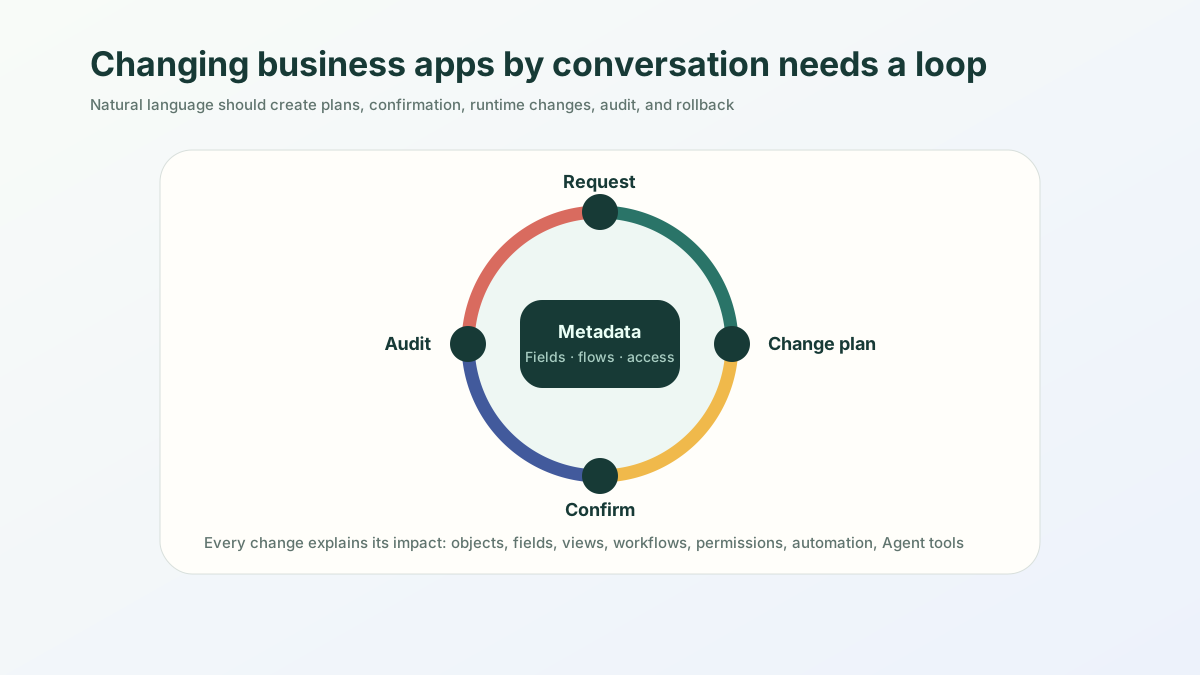
The short version: The real value of changing systems by conversation is not “chat and it changes.” It is that every added field, changed flow, or adjusted permission lands in a reviewable, reversible metadata layer. Fast to change, and controlled enough to trust.
After a business system goes live, the real work begins.
The support lead wants another field. The sales director wants to change a stage. Finance wants an approval step. Legal wants to adjust risk rules. Operations needs one more dashboard. IT wants tighter permissions. In traditional software delivery, all of these become tickets: estimate, schedule, develop, test, release.
The most important promise of AI Builder is that a large share of these changes can move from “submit a request” to “modify through conversation.”
But this must be stated carefully. Conversational modification does not mean AI is allowed to change the system casually. It means natural language should generate an explainable, confirmable, and reversible metadata change plan.
What Readers Will Worry About
From the perspective of low-code platform users, “changing an app by conversation” sounds convenient, but also risky.
They will naturally ask:
- Will AI modify the wrong object?
- Will a new field break existing forms?
- Will a workflow change affect requests already in approval?
- Could a permission change expose sensitive data?
- Could automation send the wrong notification?
- Could an Agent perform an action beyond its authority?
- Can the system roll back after the change?
So an article about AI Builder should not only say “change an app with one sentence.” The real question is how the platform turns one sentence into a controlled change.
Change Type 1: Add a Field
The user says:
Add a “renewal risk” field to customers, with low, medium, and high as options. High-risk customers should appear on the customer success manager’s board.
A professional AI Builder should not execute this immediately. It should generate a change plan:
| Change item | Plan |
|---|---|
| Object | Modify customer |
| Field | Add enum field renewal_risk |
| Forms | Show it on customer detail and edit pages |
| View | Add a “High-risk renewal customers” board |
| Permissions | Customer success managers can edit; sales can read |
| Automation | Notify the owner when risk becomes high |
| Agent | Allow customer summaries to reference the field |
Only after the user confirms should the platform update metadata.
This is different from simply “adding a column.” The field enters the whole application runtime, not just the database.
Change Type 2: Modify a Workflow
The user says:
When an expense claim is over 3,000, send it to the direct manager first, then the finance manager. If the related project budget is insufficient, the budget owner must also confirm.
This sentence involves conditions, approval nodes, states, notifications, exceptions, and audit records.
The Builder should generate:
- An amount condition;
- A direct-manager approval node;
- A finance-manager approval node;
- A budget sufficiency check;
- A budget-owner approval node;
- Rejection and “request more information” paths;
- Approval comments and timestamp audit.
It should also explain the impact scope: does the new workflow affect only newly submitted expense claims, or does it also affect claims currently in approval? If it affects running instances, is migration required?
This is a crucial professional detail in low-code platforms. A workflow is not finished when it is drawn on a canvas. It also has to coexist with live process instances.
Change Type 3: Generate a View
Views are one of the best places for conversational generation because users often know what they want to see, but not how to configure filters and sorting.
The user says:
Create a “high-risk projects this week” view for project managers, sorted by expected delay days, and show only projects I own.
The platform should generate:
- Object: project;
- Filter: risk level is high and the expected impact affects this week’s milestone;
- Permission: show only projects owned by or involving the current user;
- Sort: expected delay days descending;
- Fields: project name, owner, milestone, risk reason, next action;
- Presentation: list or board.
A good Builder should also allow follow-up requests:
Add one more column: “latest meeting decision.”
At that moment, it should not rebuild the page. It should modify the view metadata.
Change Type 4: Adjust Permissions
Permissions are the most sensitive part of conversational modification.
The user says:
Sales reps can only see customers they own, regional managers can see customers in their region, and executives can see all customers.
The sentence sounds clear, but the platform must generate and display a permission matrix:
| Role | Record scope | Field scope | Allowed actions |
|---|---|---|---|
| Sales rep | Customers they own | Hide cost and sensitive contract clauses | Create follow-ups, update activities |
| Regional manager | Customers in their region | Can view summarized amounts | Assign owners, view risks |
| Executive | All customers | Can view summary data, may not edit | View reports; export requires approval |
Agent queries must inherit the same permissions. If a sales rep asks “which customers are high risk,” the system may only return customers that rep is allowed to see.
AI can help configure access control, but it must not make access control feel lightweight or casual.
Change Type 5: Create Automation and Agent Actions
The user says:
Every Monday morning, summarize high-risk customers for customer success managers and create follow-up tasks for the owners.
The platform should split this into:
- A scheduled trigger;
- A query for high-risk customers;
- Grouping by owner;
- An internal summary;
- Follow-up task creation;
- Automation run logs;
- Administrator notification on failure.
It also needs to classify action risk:
- Internal summary: low risk;
- Create task: low to medium risk;
- Change customer risk level: medium risk, confirmation required;
- Send email to a customer: high risk, approval or manual send required.
The point of conversational automation is not “do more automatically.” It is to distinguish actions that can be automated from actions that require confirmation.
Four Product Details a Good Conversational Builder Needs
First, show the change plan. Users should know which objects, fields, views, workflows, permissions, and automation rules the platform intends to change.
Second, show the impact scope. For permissions, workflows, and automation especially, the platform should explain which roles, records, and running instances are affected.
Third, support preview and rollback. Users should be able to preview before changing and return to a previous version afterward.
Fourth, keep an audit trail. The system should record who requested the change, how AI explained it, whether a human confirmed it, and what the platform actually changed.
Without these four details, “changing apps by conversation” becomes a dangerous black box.
The Value of ObjectStack
ObjectStack is well suited for conversational application iteration because it keeps application structure at the metadata layer.
Fields, views, workflows, permissions, automation, and Agent tools are not scattered across code. They are business structures that can be generated, explained, modified, versioned, and audited.
Business users describe the change in natural language. The platform generates a change plan. An administrator or business owner confirms it. The runtime then works from the new metadata, and Agents inherit the same object, permission, and action boundaries.
That is the key to changing business systems by conversation: AI is not temporarily patching a feature for you. The business system becomes continuously shapeable by business language while still preserving the governance that a low-code platform should provide.