How Do You Import a Spreadsheet From an Old System Into an AI-Built App? Import Mappings, Dry Runs, and the Three Ways a Row Can Fail to Match
Measured on ObjectStack 18.3.0: a named import mapping projects foreign headers and codes onto one object, a dry run returns the whole per-row report with nothing stored, and a non-matching row is created, skipped or failed.
The short version. The spreadsheet from the old system has headers that are not your field names and codes that are not your codes. The fix is an import mapping: a named, versioned projection from the file’s columns onto one object’s fields, in which map translates the other system’s codes and upsertKey decides what “the same row” means. The mapping is strict, so a column it does not name never reaches the write path. dryRun: true returns the complete per-row report with nothing stored. Measured on the published @objectstack/cli 18.3.0: a 3-row CSV came back created: 3 from the dry run while the table still held 0 rows, held 3 rows after the real run, and answered updated: 3 when the same file was sent again. The dry run is the review: a before-and-after count you sign off before anything lands.
Everything below was run, not described. The app is a fresh npm create objectstack@latest scaffold on 18.3.0 carrying the Lead object from the CRM example that ships in the ObjectStack repository, and every count is quoted from the server’s own report.
The file that arrives every Monday
Here is the file. It is three rows long so the whole thing fits on the page; the mechanics are the same at three thousand.
Full Name,E-mail,Company,Channel,Legacy ID
Ada Lovelace,[email protected],Analytical Engines,Webform,L-1001
Alan Turing,[email protected],NPL,Partner Referral,L-1002
Grace Hopper,[email protected],Eckert-Mauchly,Webform,L-1003
And here is the object it has to land in. The CRM example’s crm_lead declares a name, an email, a company and a source select whose stored values are web, referral, event, social, cold_outreach and partner.
Three things are wrong with the file, and they are the three things every export from another system gets wrong:
- The headers are theirs.
Full Nameis ourname;E-mailis ouremail. - The codes are theirs. Their
Webformis ourweb; theirPartner Referralis ourpartner. Neither spelling exists on our side. - There is a column that must not land.
Legacy IDis the old system’s primary key. It has no field here, and it should not acquire one by accident.
A one-off rename in an import wizard handles the first problem and nothing else. The other two need something that is written down once and applied every week.
An import mapping is a projection, not a rename
The ObjectStack docs define the artifact in one sentence: “An import mapping is a named, reusable projection from the columns of a source file onto the fields of one object.” It is a first-class metadata kind, so it ships inside a package or is saved at runtime, and POST /api/v1/data/:object/import applies it by name. This is the one the measurements below used, declared in the app’s source next to the objects:
import { defineMapping } from '@objectstack/spec/data';

export const LeadFeedMapping = defineMapping({
  name: 'crm_lead_feed',
  label: 'Lead feed (legacy CRM export)',
  sourceFormat: 'csv',
  targetObject: 'crm_lead',
  fieldMapping: [
    { source: 'Full Name', target: 'name' },
    { source: 'E-mail', target: 'email' },
    { source: 'Company', target: 'company' },
    {
      source: 'Channel',
      target: 'source',
      transform: 'map',
      params: { valueMap: { Webform: 'web', 'Partner Referral': 'partner' } },
    },
  ],
  mode: 'upsert',
  upsertKey: ['email'],
});
It is registered on the stack with mappings: [LeadFeedMapping], and defineStack() validates it while you build rather than at first use: a targetObject the stack does not define fails the build, and so does a javascript transform (more on that below). Because defineMapping() parses the config at import time, a misspelled key is rejected where you wrote it with the canonical spelling named in the error. That is what makes the mapping typed metadata rather than a config file: a reviewer reads twenty lines and knows the projection is well-formed before any row is read.
| Key | What it decides |
|---|---|
fieldMapping[] | One entry per target field: which source column feeds it, and through which transform |
transform: 'map' + valueMap | Translates the source system’s codes into yours. A value with no entry in the table passes through unchanged |
mode | Supplies the request’s writeMode when the request omits it: insert, update or upsert |
upsertKey | Supplies the request’s matchFields: the fields that decide whether a row is “the same row” as a stored record |
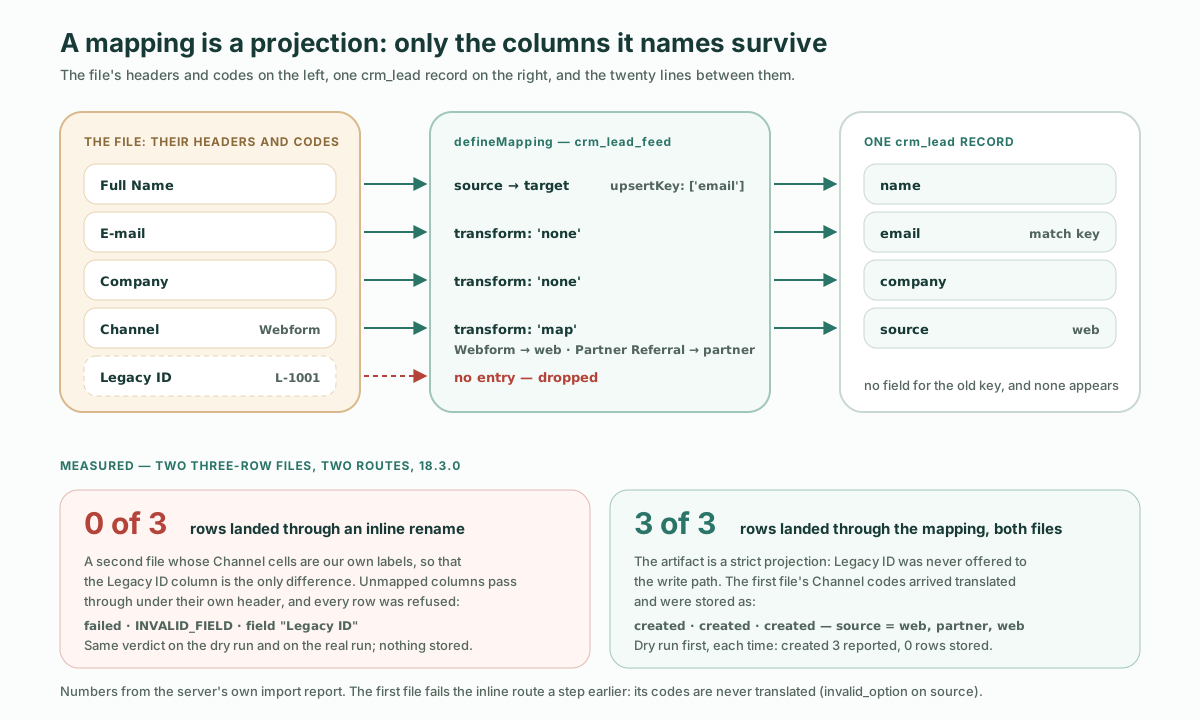
The word that matters in the definition is projection. The import endpoint accepts two mapping mechanisms, and they differ on exactly the third problem above. An inline mapping on the request is a rename: its array form can trim a cell, change its case or fill a blank one, but it has no code table, and columns it does not name “pass through to the write path under their own header”. A named mapping is the opposite: unmapped columns are “Dropped. The artifact is a strict projection: only mapped targets survive.”
That difference is measurable, so it was measured, on a second three-row file built so that the junk column is the only thing the two routes can disagree on: its Channel cells hold our own option labels (Website, Partner), which resolve without any mapping, and it carries the Legacy ID column. It was sent with an inline rename of the four known columns, as a dry run and as a real run, and with mappingName: "crm_lead_feed" as a dry run:
| Route | Rows that landed | What the report said about each row |
|---|---|---|
Inline mapping, dry run | 0 of 3 | failed, code: "INVALID_FIELD", field: "Legacy ID", “Unknown field ‘Legacy ID’ on object ‘crm_lead’” |
Inline mapping, real run | 0 of 3 | The same three verdicts; nothing stored |
mappingName, dry run | 3 of 3 | created |
The inline route is not broken. It did what a rename does: it passed Legacy ID through under its own header, and the write path refused a field the object does not declare. The mapping never let the column near the write path. The first file, with its Webform and Partner Referral codes, fails the inline route one step earlier: every row is refused with invalid_option on source, “Lead Source: ”Webform“ is not a known option”, because nothing translated the codes. For a file that arrives every week from a system you do not control, those two guarantees are the reason to write the twenty lines.
The mapping can also be saved at runtime instead of shipped in the package: PUT /api/v1/meta/mapping/crm_lead_feed_saved with the same shape under a new name answered Saved mapping 'crm_lead_feed_saved' (env-wide, state=active) [seq=1], and a dry run that named it reported created 3. Either way the import request resolves a mapping by name; the runtime reads saved mappings first and falls back to the packaged one. The packaged name itself is locked: the same PUT to crm_lead_feed was refused with 403 NOT_OVERRIDABLE.
The dry run is the review
The request that makes the mapping worth having is short, because the artifact supplies the write mode and the match fields:
POST /api/v1/data/crm_lead/import
{
  "format": "csv",
  "csv": "Full Name,E-mail,Company,Channel,Legacy ID\nAda Lovelace,...",
  "mappingName": "crm_lead_feed",
  "dryRun": true
}
The dry run came back with the whole report, aggregate counters plus one verdict per row:
{ "object": "crm_lead", "dryRun": true, "writeMode": "upsert",
  "total": 3, "ok": 3, "errors": 0, "created": 3, "updated": 0, "skipped": 0,
  "results": [
    { "row": 1, "ok": true, "action": "created" },
    { "row": 2, "ok": true, "action": "created" },
    { "row": 3, "ok": true, "action": "created" } ] }
Then the table was read: "total": 0. Nothing was stored. The same body without dryRun answered "created": 3 with an id on every row, and the table read "total": 3, with source holding web, partner and web, the translated codes rather than the file’s. The same file sent a third time answered "created": 0, "updated": 3, and the table still read 3. That is the whole before-and-after, in three numbers:
| Step | Report | Rows in the table afterwards |
|---|---|---|
| Dry run | total 3 · created 3 · updated 0 | 0 |
| Real run | created 3 | 3 |
| Same file again | created 0 · updated 3 | 3 |
Why call this the review rather than a preview? Because it is the artifact a reviewer can actually sign off. The docs put it precisely: "dryRun": true returns “the same report with nothing persisted; the verdict comes from the engine’s own write-path validation.” It is not a guess about what the write would do; for each row it asks the write path for its verdict and stops short of persisting. So the thing a business owner approves before the Monday import runs is two small objects: the mapping (twenty lines of typed metadata, in version control, readable as a diff) and the dry-run report (how many rows will be created, how many updated, which ones will fail and on which column). Nothing has happened yet when they sign, and the second run is the proof that the first one meant what it said.
The preview holds for rows it will update, too. Sent once more after the three rows existed, the dry run answered created 0 · updated 3, the same verdict the real run then gave. An update is previewed against the stored record merged with the file’s cells, so a rule that reads a field the file does not carry, such as the Lead object’s lead_score_range check on lead_score, judges the record the write would actually store. Before 18.0 the preview judged the incoming cells alone, and could refuse a row the write then accepted. A row the write would admit despite an advisory finding comes back ok with a warnings list attached, so the complaint is visible in the report rather than silent; none of the runs here produced one.
Three ways a row can fail to match
upsertKey: ['email'] says what “the same row” means. The interesting cases are the rows where that lookup does not find exactly one record. The docs are blunt about this: “a row that does not match” is not one behaviour but three, chosen by writeMode and by how many records matched.
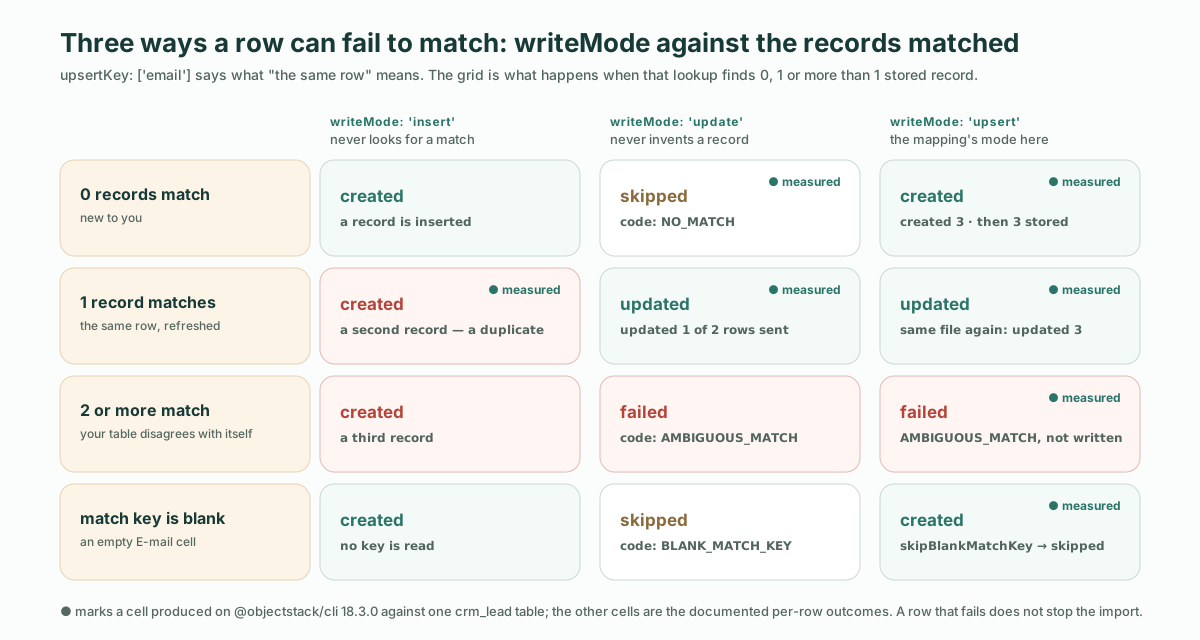
All three were produced against the same table, and each is a different kind of answer:
| Rows matched | writeMode: 'upsert' | writeMode: 'update' | What it means for the file |
|---|---|---|---|
| 0 | created | skipped, code: "NO_MATCH" | New to you. Upsert admits it; update refuses to invent a record |
| 1 | updated | updated | The same row, refreshed |
| 2 or more | failed, code: "AMBIGUOUS_MATCH" | failed, code: "AMBIGUOUS_MATCH" | Your table already disagrees with itself; nothing is written for that row |
The measured runs: a two-row file sent with writeMode: "update" answered updated 1, skipped 1, with the unknown person’s row reading "action": "skipped", "code": "NO_MATCH". Then one row was loaded twice with writeMode: "insert", which never looks for a match, so the table held two records with the same email, and the same row sent as an upsert answered "action": "failed", "code": "AMBIGUOUS_MATCH", with the message “matchFields matched more than one crm_lead record”. The duplicate is a fact about the table, and the import reports it instead of picking one.
There is a fourth row worth knowing about: the one whose match field is blank. A row with an empty E-mail cell was created by the upsert, because upsert creates such a row by default; with "skipBlankMatchKey": true on the request, the same row came back "action": "skipped", "code": "BLANK_MATCH_KEY". Which of the two you want depends on whether a lead without an email is a lead or a typo, and that is a decision the request carries, not the mapping.
One more case arrived in 18.2: a file that disagrees with itself. When two rows of one upsert or update carry the same match key, neither is written, on the dry run as on the real run. A three-row file listing [email protected] twice answered ok 1 · errors 2; the third row was created, and both duplicates came back "action": "failed", "code": "DUPLICATE_MATCH_KEY" with this message:
Rows 1, 2 of this import have the same match key (email), so none of them was written: keep one row per key and import againThe fix belongs in the spreadsheet: keep the row that is right and send the file again.
After the mapping, the cell still has to be legal
The mapping decides which value lands in which field. Turning that value into something storage accepts is a separate step, run afterwards from the target object’s own field metadata, and the two steps fail differently. A four-row file exercised them in one request:
| The cell | What happened | The row’s verdict |
|---|---|---|
Channel = Trade Show, a code the valueMap does not know | The map passed it through unchanged, as documented; the select coercion then found no option called Trade Show | failed, field: "source", code: "invalid_option", “Lead Source: ”Trade Show“ is not a known option” |
Channel = Event, not in the valueMap, but the label of an existing option | Passed through unchanged; resolved to the stored value event by label, with no mapping entry involved | created |
E-mail = not-an-email | The email field’s own coercion refused it | failed, field: "email", code: "invalid_email" |
E-mail blank | Admitted by upsert, as above | created |
Two of the four rows landed, two did not, and the report read "ok": 2, "errors": 2. A row that fails does not stop the import; it gets its own line with the offending column named, which is the line someone fixes in the spreadsheet before next Monday.
The second case deserves a sentence, because it bounds what map is for. Select labels already resolve to stored values without any mapping, in the app’s own language and in its translations. So the valueMap is not for teaching the import your option labels; it is for the other system’s codes, the spellings that are neither your values nor your labels. Webform needs the map. Event never did.
Refused before any row is read
Some requests are refused whole, with no per-row report, because answering them row by row would hide a mistake in the request itself. Three of these were measured; the rest are from the documented table.
| Status | code | Cause |
|---|---|---|
| 404 | MAPPING_NOT_FOUND | No mapping registered under that name. Measured: “No mapping artifact named ”crm_lead_feed_nope“ is registered” |
| 400 | CONFLICTING_MAPPING | Both mappingName and an inline mapping on one request. Measured: “Provide either mappingName or an inline mapping, not both” |
| 400 | MAPPING_TARGET_MISMATCH | The artifact’s targetObject is not the object in the URL |
| 400 | UNSUPPORTED_TRANSFORM | Some entry declares javascript, or a transform the pipeline does not implement |
| 413 | PAYLOAD_TOO_LARGE | More than 5,000 rows on the synchronous route |
The ceiling is exact. A 5,001-row file was refused with “Import limit is 5000 rows per request (got 5001). Use an async import job for larger files.” A 5,000-row file, as a dry run, came back "total": 5000, "ok": 5000, "created": 5000 in one response. Above that, POST /api/v1/data/:object/import/jobs parses the identical body and takes up to 50,000 rows, returning a job id to poll; that route was not exercised here.
What this does not solve
Custom code in the mapping. TransformType declares seven values: none, constant, map, split, join, lookup and javascript. The first five run row by row, lookup is a deliberate pass-through to the import’s own reference resolution, and javascript is refused, because “there is no server-side sandbox, and silently skipping a declared transform would corrupt data”. Both halves of that refusal were measured on 18.3.0. Changing one entry of the packaged mapping to transform: 'javascript' failed objectstack build with “Mapping ‘crm_lead_feed’ uses transform ‘javascript’, which the import path does not execute (no server-side sandbox). Use none/constant/map/split/join/lookup, or model the logic as a flow.” Saving the same thing at runtime through PUT /api/v1/meta/mapping/... was accepted, and the first import that named it was refused with 400 UNSUPPORTED_TRANSFORM. For logic beyond the five transforms, the docs’ answer is to transform the data before you post it or to model it as a flow on the target object. That is the right limit for a reviewer, too: a mapping you can read whole is a mapping you can approve.
Deciding what the old column meant. The mapping records the decision that Partner Referral means partner. It does not make it. Someone who knows both systems still has to say which of six source values a Trade Show lead is, and whether a lead with no email is a lead.
The import wizard, automations and the asynchronous route. The wizard that saves a mapping from a user’s column choices is a product surface this post does not cover; everything here stayed on the REST route an agent or a script would use. The request accepts a runAutomations key; what the rows trigger on their way in is a topic of its own. And the 50,000-row job route was named, not run.
Where this sits in a migration
This is the loading step, and it is deliberately small. If the question is whether to move the old system at all, the staged path off a legacy internal system is the strategy: connect read-only, measure your declared rules against the history, enable writes one object at a time. If the old system is staying and you want AI on its data without moving anything, connecting the database you already run is the mechanism, and the manufacturing version shows where to start when the system is an ERP. Import mappings are for the case in between: the system is going away, or it never had an API, and what you have is a file.
Hosted, or on your own infrastructure
Everything above ran on the open-source runtime a scaffold installs. ObjectOS comes in three editions: ObjectOS Community, open source and free to self-host; ObjectOS Cloud, hosted in the browser with nothing to install; and ObjectOS Enterprise, self-managed on your own infrastructure. Your ontology is ordinary ObjectStack metadata. Exporting it from ObjectOS Cloud or ObjectOS Enterprise to run on the open-source ObjectStack runtime is planned. The mapping is part of that ontology: it travels with the package.
Start with the agent path
npm create objectstack@latest crm && cd crmThen hand your coding agent the file and the docs page for import mappings (objectstack.ai/docs/data-modeling/import-mappings), and ask for three things: the object the rows belong to, a defineMapping whose valueMap translates every code the file uses, and a dry run of the real file. What comes back is the review: a mapping short enough to read in one sitting, and a report that says how many rows will be created, how many updated, and which cells someone has to fix. Sign that, and run the import. Then run it again next Monday and read updated where you expect it.